Submit a substitution application when all of the following apply:
- you wish to substitute a compulsory or an optional course in your plan
- you have completed the substituting studies in another higher education institution in Finland (universities, the National Defence University, universities of applied sciences) or abroad or you are requesting the recognition of learning acquired in non-formal or informal education
- you do not have a credit marked in Sisu for the studies in question.
Select the course to be substituted
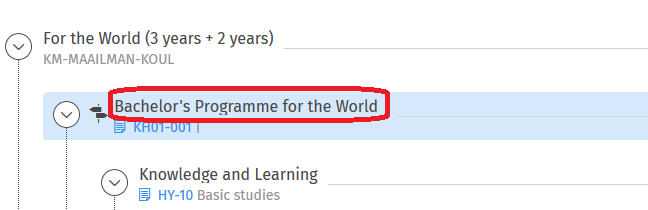
- Start the application for substitution from the Structure of studies page. First, find the course from your study plan that you wish to substitute.

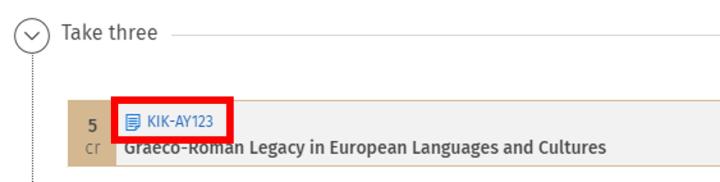
- Open the course brochure by clicking the code on the course’s icon.
- Open the course brochure’s Equivalences and substitutions tab.
-
You can find the heading Substitution at the bottom of the tab, and below the heading is the Go to application button. Click the button and the substitution application opens up.

- Click the button ‘Add information on studies or other prior learning’ in the middle part of the pop-up window.

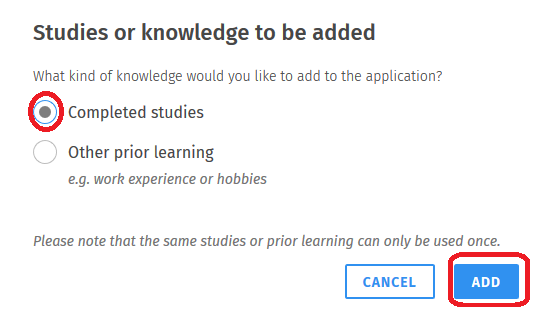
- Select the type of the studies you would like to add to the application in a new pop-up window.
- Select ‘Completed studies’ from the radio buttons if you have completed the credits in another higher education institution.
- Select 'Other prior learning' if the learning has been acquired in non-formal or informal education.
- Click the Add button.
Add the substitution’s information
Fill in the information of the course you have completed elsewhere, such as the scope and name of the course in the original place of completion, in the text fields of the view that opens. Add the name of the substituting course also in Finnish and Swedish, if possible. Give the objectives, contents and possible literature of the completed course in the Description field.
If necessary, next you can add another substitution’s information by clicking the ‘Add information on studies or other prior learning’ button again, which is now shown below the information of the course you have completed elsewhere. Do this when, for example, you wish to substitute a 10-credit course with two 5-credit courses that have been completed elsewhere.
Add attachments
Add attachments by clicking the Choose files button in the bottom corner of the page or by dragging the files in the light grey field that says “Drop files to attach”. You will need a transcript of studies from the university where you have completed the studies as well as a description of the completed course as attachments for the substitution application. Please attach a description of the completed course as an attachment (e.g. screenshot) to the application if you have not added it to the Description field. If you are applying for substitution on the basis of non-formal or informal learning, you must attach to your application a description of how the learning corresponds to the learning outcomes of the studies whose recognition you are requesting.Your application cannot be processed without a transcript of studies and a description of the course. If necessary, also add the attachments required by your degree programme. Additional information on the required attachments is available on the page Recognition and validation of prior learning. Finally, click the Continue button in the bottom right corner of the application.

Alternatively, you can add a link to the completed credits in the description field. You can find the link in the My Studyinfo service under My completed studies (information in Finnish and Swedish only). NB! Please first check that the linked information is correct. Please also note that the link is valid for only six months.
Choose how you want to be informed of the decision
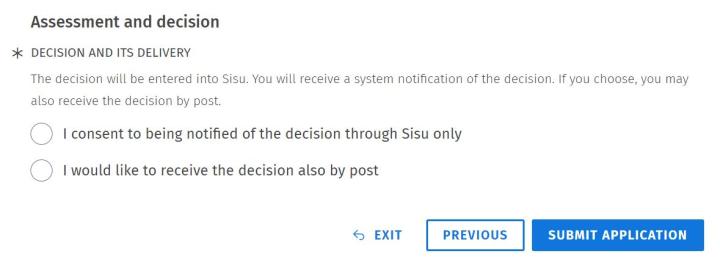
Now, a heading Assessment and decision will appear at the bottom of the application. Select how you wish to be informed of the decision. We recommend that you choose the electronic decision if you do not necessarily need the decision on paper. Click the Submit application button in the bottom right corner of the application. After this, you can print out the application from the upper corner of the view.
Notification of the decision
You will get a notification of the decision in Sisu’s frontpage and messages. The application can also be found from the My profile page. After your substitution application has been approved, the substituted course will be shown as completed in your study plan.